At 3studio, we are always looking for ways to make ADR and voice-over sessions more efficient, comfortable and professional for everyone involved.
Pro Tools remains at the centre of our recording workflow, but an ADR session requires more than simply recording audio. Performers need dialogue prompts, accurate visual cues, countdown beeps and an unmistakable indication of whether they are rehearsing or recording.
The engineer may already be managing Pro Tools, picture playback, recording levels, talkback and communication with the performer, director or dialogue editor. Any additional system should reduce that workload rather than add another interface requiring constant attention.
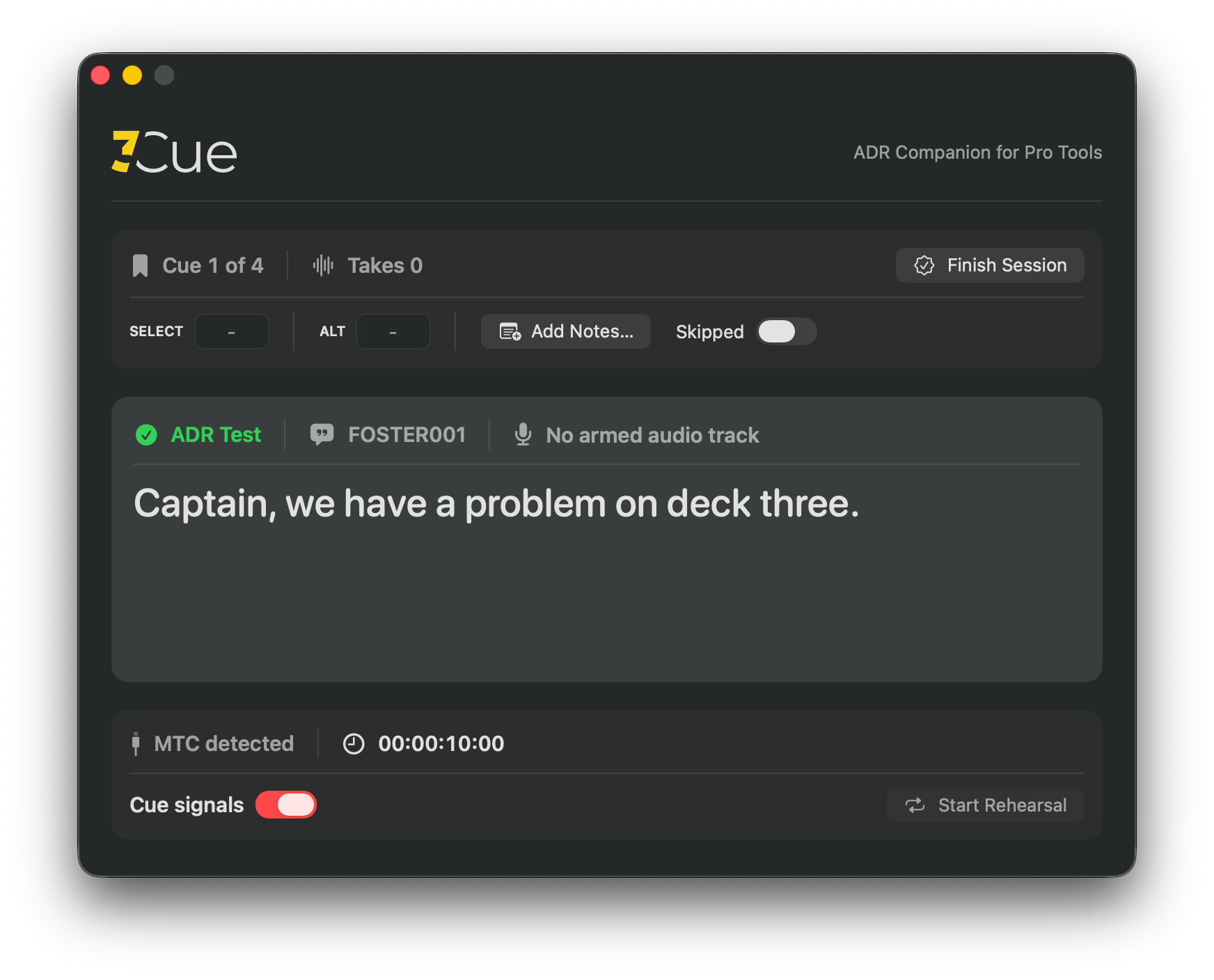
To bring these elements together, we have developed 3Cue - our own lightweight ADR and VO companion for Pro Tools.
3Cue handles the performer-facing and supporting ADR workflow automatically, allowing Pro Tools to remain focused on playback, recording and editing.
Pro Tools stays focused on recording
A central aim of 3Cue is to let Pro Tools remain a clean, familiar recording session.
There is no 3Cue plug-in to insert, no visual-cue video to render and no dedicated MIDI trigger track that must be placed on the timeline.
There is also no need to create and manage a separate ADR beep track. The engineer does not have to copy beeps between sessions, align them with every cue or repeatedly mute and unmute them during recording and playback.
By removing these support tracks from the Pro Tools session, 3Cue helps keep the timeline clear and focused on the material that needs to be recorded, edited and delivered.
This is particularly useful on long-form projects or when moving between several episodes during the same recording session. There are fewer tracks to navigate, fewer timeline elements to manage and fewer opportunities for a cue trigger or beep region to be moved, muted or misaligned.
3Cue independently handles:
- Dialogue display
- Cue names and numbers
- Visual streamers and countdowns
- ADR beeps
- Rehearsal status
- Standby and recording tallies
- Take counting
Pro Tools continues doing what it does best - playing picture and sound, managing pre-roll, recording performances and editing audio.
The cues used by 3Cue are ordinary Pro Tools Memory Locations. Their names identify the cues and their comments contain the dialogue. The essential cue information therefore remains visible and understandable even when 3Cue is not running.
Existing ADR sessions can remain recognisably Pro Tools sessions. Engineers can continue using familiar pre-roll, QuickPunch, editing and recording workflows without reorganising the timeline around another application.
3Cue does not try to replace Pro Tools or impose a proprietary session structure. It works alongside the session and quietly handles the additional ADR workflow around it.
A MIDI connection is used for timing and transport information, but there is no cue-trigger MIDI track to create or maintain on the Pro Tools timeline.
Designed to stay out of the way
3Cue is designed to require as little attention as possible during a recording session.
Once the talent display, visual cue style and audio preferences have been configured, most of its live-session behaviour is automatic.
3Cue follows the engineer’s normal actions in Pro Tools:
- Moving to a cue updates the dialogue and talent display
- Preparing to record places the performer display in its ready state
- Starting a recording pass begins the standby sequence
- Reaching the cue point changes the tally to RECORDING
- Stopping the transport clears the active pass
- Moving to another cue prepares the next line
- Changing Pro Tools sessions reloads the appropriate cues
Cue locking, track naming, take counting, interrupted pre-rolls and session changes are handled without requiring the engineer to operate a second interface during the take.
If Pro Tools needs to be closed and relaunched, 3Cue can recover and reconnect to the working session.
The engineer remains focused on Pro Tools, the performance and the people involved, while 3Cue handles the supporting workflow in the background.
A clearer experience for the performer
The main 3Cue application remains with the recording engineer. The performer instead sees a separate full-screen display on a selected studio monitor.
Before a take, the talent display can present:
- The current cue name
- The dialogue to be recorded
- The cue number
- The number of completed takes
- Optional timecode
- A clear session status
When Pro Tools is ready for recording, the talent display shows IDLE while the engineer and performer prepare.
Once the recording pass begins, the display changes to STANDBY. A visual streamer or countdown then leads the performer towards the cue point, accompanied by the familiar ADR countdown beeps.
At the cue point, the tally changes to RECORDING.
This gives the performer clear and immediate information without exposing the Pro Tools interface or the engineer’s controls.
The dialogue layout adapts to the material. Short ADR lines can be shown in large, easily readable text, while longer voice-over passages make better use of the available display.
The performer can concentrate on delivering the line rather than interpreting the recording setup.
Driven by the Pro Tools session
3Cue follows the open Pro Tools session and uses its Memory Locations as ADR cues.
The Memory Location name identifies the cue, while its comments contain the dialogue to be recorded.
When the engineer moves to a cue, 3Cue updates automatically. The correct dialogue and cue information are shown to both the engineer and performer.
At the beginning of a recording pass, 3Cue locks onto the intended cue. Nearby or overlapping markers cannot unexpectedly change the displayed dialogue during pre-roll or recording.
New or amended Memory Locations can also be recognised during the session. This is useful when an additional line is identified after recording has already begun.
If the engineer moves away from every cue, the cue information is cleared rather than incorrectly displaying the next or previous Memory Location.
This keeps Pro Tools as the source of the session position while avoiding a separate live cue list that must be manually maintained throughout the day.
Visual streamers and ADR beeps
Visual streamers provide a continuous indication of when the performer should begin speaking.
3Cue includes a selection of visual cue styles, allowing us to choose an approach that suits the performer and the material being recorded. These include travelling wipes, target bars, countdowns, converging indicators and flutter-style cues.
An optional visual punch can also be shown at the cue point.
ADR countdown beeps are generated by 3Cue and remain synchronised with the visual cue. This is what allows the Pro Tools session to remain free from manually prepared beep regions and dedicated beep tracks.
The engineer can quickly enable or disable the beeps if a performer prefers to work without them. Their output and sound can also be configured for the studio monitoring setup.
For more specialised recording workflows, an optional fourth cue-point beep is available.
Rehearsal without recording
3Cue includes a dedicated Rehearsal mode.
This provides the performer with the same dialogue, visual cue and countdown beeps as a real take, while clearly stating that Pro Tools is not recording.
A prominent REHEARSAL - NOT RECORDING indication remains visible so there is no confusion between a practice pass and a genuine take.
Rehearsal follows the same Pro Tools playback workflow as the real recording. Once Pro Tools is prepared for recording, Rehearsal is automatically disabled.
If a pass needs to be abandoned during pre-roll - perhaps because the performer is not ready or the director needs to intervene - the visual cue and remaining beeps stop immediately.
The cue is then ready for another attempt without waiting for the countdown to finish.
Preparing cues for a session
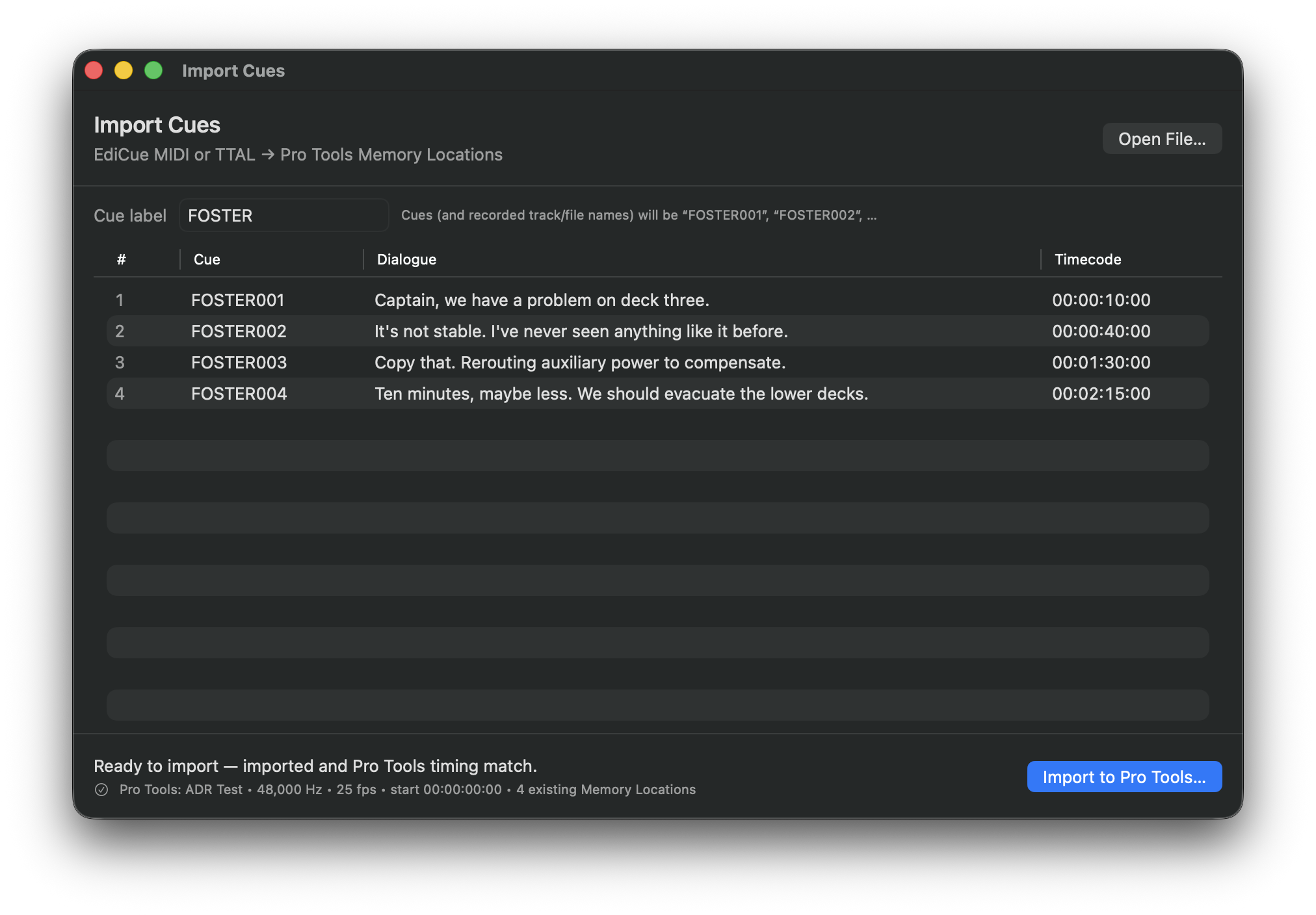
3Cue now includes an integrated cue importer.
It can read ADR cue information from MIDI files exported by EdiCue or TTAL scripts and prepare the corresponding Memory Locations in Pro Tools.
The imported information includes:
- Cue names
- Dialogue
- Timeline positions
The engineer can review the supplied cues before anything is added to the session.
3Cue checks the cue information against the open Pro Tools session before proceeding. Once confirmed, the Memory Locations are created and the session moves to the first imported cue.
The main 3Cue display then updates automatically.
This brings session preparation and recording assistance together in one application. It also reduces the repetitive setup required before an ADR session can begin.
The result is still a standard and understandable Pro Tools session built from ordinary Memory Locations rather than a proprietary cue structure.
Supporting the recording engineer
Although much of 3Cue is designed around the performer’s experience, it also removes repetitive tasks from the engineer’s workflow.
3Cue can optionally name the active recording track from the current cue. This allows recordings created by Pro Tools to inherit a useful cue-based name.
When the engineer moves away from a cue to record a wild line, the track is prepared as WILD.
If the engineer enters another track name manually, that decision takes priority and 3Cue leaves it unchanged. Moving to another cue allows 3Cue to apply the new cue name automatically.
3Cue also keeps a simple count of completed takes for each cue. Rehearsals and recordings abandoned during pre-roll are not counted as completed takes.
These features operate automatically because the engineer should not need to manage another application while recording a performance.
Lightweight by design
Recording reliability remains the priority.
3Cue is a native Apple Silicon macOS application designed to run alongside Pro Tools without becoming the focus of the workstation.
During playback and recording, it concentrates on the active cue, performer display, streamer and beeps. Session preparation and administrative operations take place while Pro Tools is stopped.
The intention is straightforward - during the most important part of the session, Pro Tools remains the primary recording system and 3Cue only performs the work required to support the engineer and performer.
Built around real ADR work
3Cue began with a simple requirement - make ADR cueing clearer for the performer without making the Pro Tools session more complicated for the engineer.
It has since developed into a broader ADR companion combining:
- Cue preparation
- Dialogue display
- Visual streamers and countdowns
- ADR beeps
- Rehearsal
- Recording status
- Track naming
- Take counting
- Session recovery
Every feature has been considered in the context of a real recording session, where clarity, reliability and speed matter more than unnecessary complexity.
Most importantly, 3Cue is intended to stay out of the engineer’s way.
Pro Tools remains Pro Tools. The timeline remains focused on the programme material and recordings. The engineer continues using a familiar workflow, while 3Cue handles the additional ADR requirements around it.
3Cue is currently an internal production tool developed for use at 3studio. It is not presently available to download or purchase.
We will continue using and refining it during ADR and voice-over work, shaped by the practical needs of performers, directors and recording engineers.
Sometimes the most useful production tools begin with a simple question - why does this part of the session need to be harder than it is?
Pro Tools is a trademark of Avid Technology, Inc. 3Cue is an independent product and is not affiliated with, endorsed by or sponsored by Avid.
EdiCue is a product name of Sounds In Sync Pty Ltd. 3Cue is an independent product and is not affiliated with, endorsed by or sponsored by Sounds In Sync.